 StratusCode
react-native-toast-hook



An animated toast message component for React Native using context API and hooks written in typescript.
Install
npm install --save react-native-toast-hook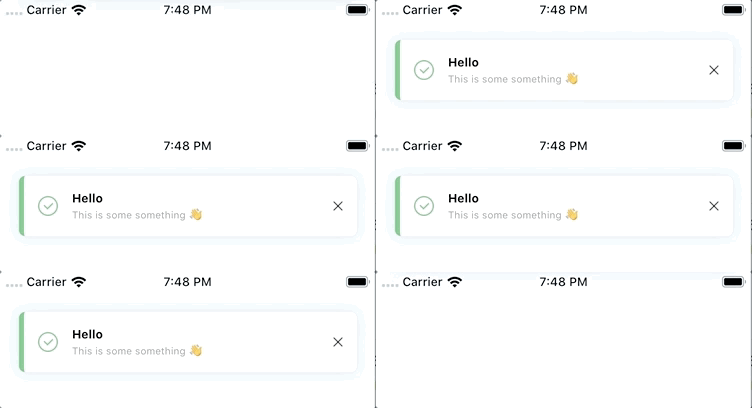
Usage
Render the ToastProvider component in your app entry file.
// App.jsx
import React from 'react'
import { ToastProvider } from '@stratuscode/react-native-toast-hook'

function App(props) {
    return (
        <>
            <ToastProvider>
                {/* ... */}
            </ToastProvider>
        </>
    )
}

export default App
Then use it anywhere in your app with the useToast hook, which provides access to showToast, queueToast, hideToast, and clearToastQueue:
import React from 'react'
import { useToast } from '@stratuscode/react-native-toast-hook'

function() {
    const { queueToast } = useToast()

    function makeToast() {
        queueToast({
            title: 'Hey you!',
            message: 'The magic medicine works!',
        })
    }

    return (
        <View>
            <Button onPress={makeToast} title="Toast It"/>
        </View>
    )
}
If your toasts aren't showing up you might need to manually place the Toaster. For example, if you're using react-navigation you'll probably want the Toaster just before the end of your </NavigationContainer>. The ToastProvider component will render the Toaster component automatically unless you pass renderToaster={false} to the ToastProvider, so do that and then place your Toaster where you want it.
import React from 'react'
import { NavigationContainer } from '@react-navigation/native'
import { createDrawerNavigator } from '@react-navigation/drawer'
import { Toaster } from '@stratuscode/react-native-toast-hook'

const Drawer = createDrawerNavigator()
function Navigation() {
    return (
        <NavigationContainer>
            <Drawer.Navigator {...etc} />
            <Toaster />
        </NavigationContainer>
    )
}
API
useToast()
The useToast hook gives you access to:
queueToast: (toast: ToastProps) => void- shows the toast immediately if one is not currently showing, otherwise queues up the toast to be shown after the current one goes away.showToast: (toast: ToastProps) => void- cuts in line and shows the toast immediately (the currently shown toast will show again after this important one goes away).hideToast: () => void- hides the currently shown toast (if any are in queue the next one will show).clearToastQueue: () => void- hides the currently shown toast and removes the entire queue.
See the types.ts file for the most up-to-date options in ToastProps and for more advanced usages, but the gist is:
queueToast({
    title?: 'Top line, bolded text',
    message?: 'Bottom line, normal text',
    type?: 'info' | 'success' | 'warning' | 'error',
    position?: 'top' | 'bottom',
    visibilityTime?: 4000,
    autoHide?: true,
    onPress?: (toast: ToastProps) => void  // callback for when the toast is pressed, e.g. to handle deep navigation
})
Global customizations
ToastProvider accepts some props to set global defaults.
- The
defaultsprop takes the same object thatqueueToast/showToasttake and will cause those functions to fallback on the default values for each prop that their object doesn't have defined. - The
colorsprop lets you override any colors used (seeToastColorsin types.ts) - The
customToastslets you configure your own toast components from scratch or override the default ones (see below).
Customizing the toast types
If you want to add custom types, or overwrite the existing ones, you can add a customToasts prop when rendering the ToastProvider. You can import the components that are used by default and customize them, use BaseToast and its render functions for almost total control, or provide your own toast implementation for total control.
// App.jsx
import React from 'react'
import { Text } from 'react-native'
import { ToastProvider, BaseToast, InfoToast, WarningToast } from '@stratuscode/react-native-toast-hook'
import Icon from 'react-native-vector-icons/FontAwesome';

const toastConfig = {
    // modify only the formatting of the default info toast's title
    info: (toast) => (
        <InfoToast renderTitle={(toast) => (
            <Text style={{ fontWeight: 'normal', color: 'fuchsia' }}>
                {toast.title}
            </Text>
        )} />
    ),
    // override existing success toast with entirely custom toast
    success: (toast) => (
        <View style={{ height: 60, width: '100%', backgroundColor: 'pink' }}>
            <Text>{toast.title}</Text>
            <Text>{toast.message}</Text>
        </View>
    ),
    // modify only the icon of the default warning toast
    warning: (toast) => (
        <WarningToast renderIcon={({color}) => (
            <Icon name="rocket" size={24} color={color} />
        )} />
    ),
    // create a new type of toast, just supply 'any_custom_type' as the `type` prop to `queueToast`/`showToast`
    any_custom_type: (toast) => {},
}

function App(props) {
    return (
        <>
            <ToastProvider customToasts={toastConfig}>
                {/* ... */}
            </ToastProvider>
        </>
    )
}

export default App
Then just use the library as before
queueToast({
    type: 'any_custom_type',
    title: 'Woohoo',
    message: 'My own custom type (:',
})
Credits
- This library was originally forked from Calin Tamas' react-native-toast-message.
- Icons (
info,success,warning,error, andclose) came from Pixel perfect's Basic UI Icon Pack from flaticon.com.