 jblh
jblh
nextworks
nextworks is a CLI that installs the Nextworks Blocks kit (core UI, sections, and page templates) into your Next.js project.
90-second install demo (silent)
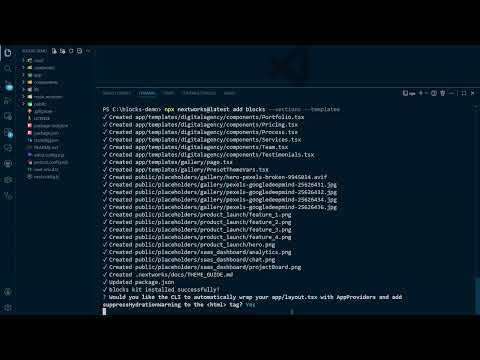
Watch a fresh create-next-app + npx nextworks add blocks --sections --templates run end-to-end (includes a quick browser tour of the gallery + templates):
This repository contains the source for the nextworks CLI and its MIT-licensed core building blocks.
Links
- Blocks kit live demo (nextworks-demo): https://nextworks-demo.vercel.app/
- Demo source (nextworks-demo repo): https://github.com/jblh/nextworks-demo
- npm (CLI): https://www.npmjs.com/package/nextworks
Status: alpha
See the GitHub Releases page for notes on each release.Install / try it (alpha quickstart):
npx create-next-app@latest
cd <your-app>
npx nextworks@latest add blocks --sections --templates
npm install
npm run dev
For the canonical CLI README (install steps, kits, and troubleshooting), see: https://github.com/jblh/nextworks-cli/tree/main/cli
If you want/need to install the underlying packages directly, prefer
@latestto avoid stale pins:npm install \ nextworks@latest \ @nextworks/blocks-core@latest \ @nextworks/blocks-sections@latest \ @nextworks/blocks-templates@latest
cli/– the CLI that powersnpx nextworks@latest ...and the install commands for Blocks.cli/kits/– the code that nextworks installs into your Next.js app (Blocks kit).cli_manifests/– manifests that describe what the CLI installs.packages/blocks-*– reusable UI/component packages used by the kits.docs/– quickstarts and guides.
Status: Early-access alpha
nextworks is currently in early-access alpha. Expect rough edges and occasional breaking changes.
Best for: experimenting in new or non-critical projects and giving feedback.
Not recommended yet for: production apps with strict stability requirements.
Compatibility (alpha)
Support matrix
CI-tested:
- OS: Windows, macOS, Linux
- Node: 20.x and 22.x
- Next.js (sandbox pin): 16.0.7 and 16.1.4 (via create-next-app in CI)
- Router: App Router and Pages Router
- Package managers: npm, pnpm, yarn
Note: CI uses pinned Next.js versions for stability and security (see CVE-2025-66478 / RSC protocol advisory).
Repo build CI (not an install test):
npm run buildon Node 18.x and 20.x (Ubuntu)
Dev mode: Turbopack (default in Next 16) and Webpack
Other 16.x versions will likely work; older versions are best effort. If you hit an issue, please include your Next.js version, Node version, package manager, OS, and relevant logs when reporting it.
Known issues (alpha)
- Existing files may be overwritten if they collide with kit paths (see Safety +
docs/FILE_CHANGES.md). - Router entrypoint patching can conflict with heavily customized
app/layout.tsx(App Router) orpages/_app.tsx(Pages Router). - Fonts/providers wiring: Blocks configures fonts in your router entrypoint (not inside shared packages) for Turbopack compatibility. If you manually edit fonts/providers and see errors, re-run the Blocks install to re-apply the patch.
Safety (read this first)
nextworks installs kits by copying files into your Next.js project. If a destination path already exists, kit installs may overwrite your files.
Before running installs, strongly consider:
- Commit first, then install:
git add -A && git commit -m "baseline"
- Review changes after install:
git diff --name-status
- To undo everything quickly:
git reset --hard- (optional) remove untracked files created by installs:
git clean -fd
If you’ve customized any of these paths, expect manual merge work:
app/layout.tsx(App Router)pages/_app.tsxandpages/_document.tsx(Pages Router)lib/utils.tscomponents/ui/**
Kits may also:
- merge dependencies into
package.json - edit your router entrypoint (Blocks)
- App Router:
app/layout.tsx - Pages Router:
pages/_app.tsx(and may create/updatepages/_document.tsx)
- App Router:
- create/update
.nextworks/config.json
For a transparent breakdown of what each kit writes/edits, see:
docs/FILE_CHANGES.md
Getting started
Install / try it (alpha quickstart):
npx create-next-app@latest
cd <your-app>
# Nextworks assumes TypeScript + Tailwind CSS (required for Blocks/templates)
npx nextworks@latest add blocks --sections --templates
Templates are installed in a router-native location:
- App Router:
app/templates/<template>/page.tsx- supporting template files live alongside it:
app/templates/<template>/**
- Pages Router:
- route entry file:
pages/templates/<template>/index.tsx - supporting template files:
components/templates/<template>/**(installed outsidepages/so Next doesn’t treat helpers as routable pages)
- route entry file:
See docs/QUICKSTART.md and the Blocks quickstarts/guides in docs/ for more detail.
Feedback & issues
During alpha, the most useful feedback is:
- Install failures or environment incompatibilities (Next.js/Node/package manager).
- Broken generated code or runtime errors after running
nextworkscommands. - Confusing or missing documentation / CLI output.
Where to post feedback
- Alpha testers — Start here (installation + where to post feedback): https://github.com/jblh/nextworks-cli/discussions/1
- Alpha feedback thread (what broke / what’s missing): https://github.com/jblh/nextworks-cli/discussions/2
Bug reports
For reproducible bugs / errors (especially install/runtime issues), please open a GitHub Issue using the templates in .github/ISSUE_TEMPLATE/.
Branding
"nextworks" is the name of this project.
You're very welcome to say that your project "uses nextworks" or "is built with nextworks". Please just avoid:
- presenting your project as if it were the official nextworks project, or
- using the name or any future logos in a way that suggests official endorsement or affiliation.