Important: This documentation covers Yarn 1 (Classic).
For Yarn 2+ docs and migration guide, see yarnpkg.com.

Package detail

node-red-contrib-myhome-bticino-v2

FredBlo135MIT2.4.0

Control Bticino / Legrand MyHome components from Node-RED

node-red, BTicino, Legrand, MyHome, OpenWebNet, OWN, CEN, CEN+, SCS

readme

node-red-contrib-myhome-bticino-v2

Control Bticino / Legrand MyHome™ components from Node-RED : node-red-contrib-myhome-bticino-v2 is a Node-RED nodes pack to interact with Bticino / Legrand MyHome™ devices making use of OpenWebNet protocol through a supported gateway (see gateway info underneath).

1. Available nodes

  • MH Light
    • ON / OFF / TOGGLE
    • Dimming : UP / DOWN / percentage based
  • MH Shutter
    • OPEN / CLOSE / STOP
  • MH Scenario
    • CEN and CEN+ scenario buttons management : Short and Long press (start / extended / release)
  • MH Temperature Central Unit
    • MANUAL:xx.x°C / PROGRAM:x / SCENARIO:xx / OFF / ANTIFREEZE / THERMAL_PROTECT
  • MH Temperature Zone
    • (MANUAL:)xx.x°C / AUTO / OFF / ANTIFREEZE / THERMAL_PROTECT
  • MH Energy
    • Read energy meters power consumption measurements
  • MH Monitoring
    • Listen for any message on the bus and sends it as payload
  • MH Inject
    • Sends any message provided in payload to bus. e.g.
      • *1*1*16## to turn on light 16
      • *#1*16## to ask for status about light 16, receiving as a response *1*1*16## when is ON or *1*0*16## when is OFF

2. Version history

v2.4.0 (latest available) - 01/2025

  • MH Monitoring
    • Improvement : new object included in returned msg (.mh_nodeConfigInfo) which contains configuration node info : .name, .ownFamilyName and .gateway (object)
    • Improvement : node has a second output which provides a structured payload object with analyzed information based on BUS received content, as it would be output by a specialized light, shutter,... node. It makes the monitoring node usable as a sort of 'universal node' : all events of one or multiple family types can be processed from a single monitoring node instead of having to add a node for each light, shutter,... point. This currently supports (see Monitoring node documentation for full detailed payload content):
      • Lights : any light point / group call
      • Shutters : any shutter point / group call
      • Temperature : only outputs current temperature update for any zone
      • Scenario : outputs any button press for CEN/CEN+
      • Energy : only outputs current consumption (instant) of any meter
  • MH Light
    • Improvement : new object included in returned msg (.mh_nodeConfigInfo) which contains configuration node info : .name, .topic, .buslevel, .lightid, .isgroup and .gateway[object]
  • MH Shutter
    • Improvement : new object included in returned msg (.mh_nodeConfigInfo) which contains configuration node info : .name, .topic, .buslevel, .shutterid, .isgroup and .gateway[object]
  • MH Scenario
    • Improvement : new object included in returned msg (.mh_nodeConfigInfo) which contains configuration node info : .name, .topic, .buslevel, .scenarioid, .scenariotype and .gateway[object]
  • MH Temperature Central Unit
    • Improvement : new object included in returned msg (.mh_nodeConfigInfo) which contains configuration node info : .name, .topic and .gateway [object]
  • MH Temperature Zone
    • Improvement : new object included in returned msg (.mh_nodeConfigInfo) which contains configuration node info : .name, .topic, .zoneid and .gateway [object]
  • MH Energy :
    • Improvement : new object included in returned msg (.mh_nodeConfigInfo) which contains configuration node info : .name, .topic, .meterid, .metertype, .meterscope and .gateway [object]

The complete version history is available in CHANGELOG.md file included in npm package or using this link to GitHub repository

3. Installation

Note : Using the previous node version node-red-contrib-myhome-bticino ? See more upgrade info/path in revision history file.

  • Easy approach when Node-RED is installed If you have Node-RED already installed the recommended install method is to use the editor. To do this, select Manage Pallette from the Node-RED menu (top right), and then select install tab in the pallette. Search for and install this node (node-red-contrib-myhome-bticino-v2).

  • Using NPM If you have not yet installed Node-RED then run following command or go to Node-RED Installation Guide.

      npm install -g --unsafe-perm node-red

    Next, to install node-red-contrib-myhome-biticino node run the following command in your Node-RED user directory - typically ~/.node-red

      npm install node-red-contrib-myhome-bticino-v2

4. Usage

4.1 First touch

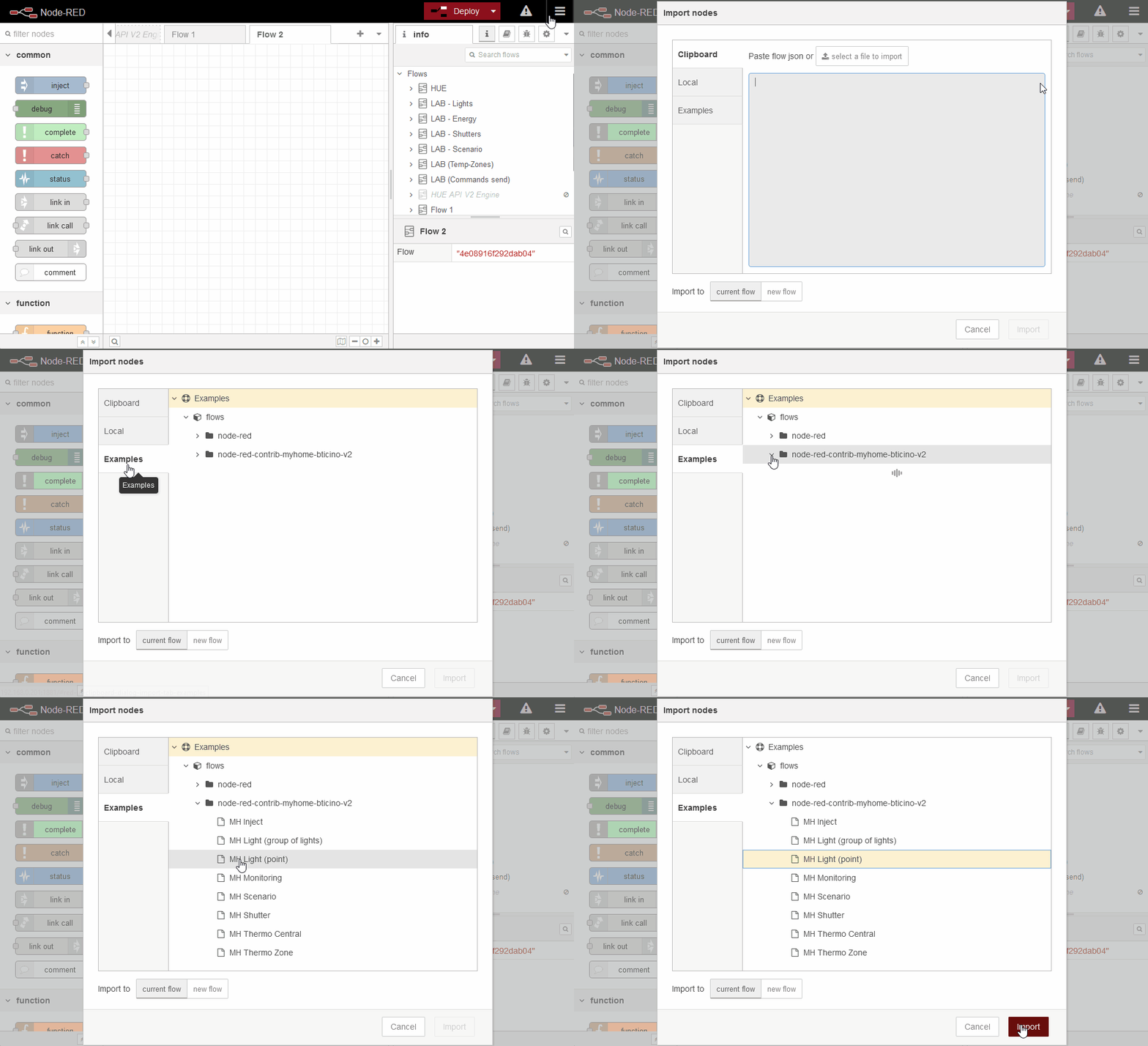
In order to easy starting to test the nodes, best way is to import an example provided with installed content (using node-red menu 'Import' and selecting one listed under 'node-red-contrib-myhome-bticino-v2'in the 'examples' tab). Examples are available for :

  • MH Energy
  • MH Light (simple point)
  • MH Light (group of lights)
  • MH Shutter
  • MH Scenario (CEN / CEN+)
  • MH Temperature Central Unit
  • MH Temperature Zone
  • MH Inject
  • MH Monitoring (discover lights)

You can also directly copy this basic flow in Node-RED selecting Import in the node-red menu, pasting the provided JSON (do not forget to change the IP address in the Gateway configuration and of course the light number in switch node) :

[{"id":"aaec927e.81712","type":"myhome-light","z":"6fa4a1d5.ce7708","lightid":"15","isgroup":false,"topic":"light","gateway":"a4e23617.d0c288","name":"My test light (A=1 / PL=5)","skipevents":false,"isstatusrequest":false,"output2_name":"","output2_type":"boolean","x":450,"y":180,"wires":[["d0e9bd53.eb9a2"],[]]},{"id":"d0e9bd53.eb9a2","type":"debug","z":"6fa4a1d5.ce7708","name":"","active":true,"tosidebar":true,"console":false,"tostatus":false,"complete":"false","statusVal":"","statusType":"auto","x":650,"y":140,"wires":[]},{"id":"64655a39.b6822c","type":"inject","z":"6fa4a1d5.ce7708","name":"ON","props":[{"p":"payload"},{"p":"topic","vt":"str"}],"repeat":"","crontab":"","once":false,"onceDelay":0.1,"topic":"cmd/light","payload":"true","payloadType":"bool","x":190,"y":160,"wires":[["aaec927e.81712"]]},{"id":"ffdb52e3.aa532","type":"inject","z":"6fa4a1d5.ce7708","name":"OFF","props":[{"p":"payload"},{"p":"topic","vt":"str"}],"repeat":"","crontab":"","once":false,"onceDelay":0.1,"topic":"cmd/light","payload":"false","payloadType":"bool","x":190,"y":200,"wires":[["aaec927e.81712"]]},{"id":"9fa0e5b6.9a17f","type":"myhome-eventsession","z":"6fa4a1d5.ce7708","gateway":"a4e23617.d0c288","name":"Discover number","own_lights":true,"own_shutters":true,"own_temperature":false,"own_energy":false,"own_others":false,"x":480,"y":260,"wires":[["193b7155.0724e7"]]},{"id":"193b7155.0724e7","type":"debug","z":"6fa4a1d5.ce7708","name":"","active":true,"tosidebar":true,"console":false,"tostatus":false,"complete":"false","statusVal":"","statusType":"auto","x":690,"y":260,"wires":[]},{"id":"a4e23617.d0c288","type":"myhome-gateway","name":"F-455","host":"192.168.0.210","port":"20000","pass":"12345","timeout":"600","log_in_lights":false,"log_in_shutters":false,"log_in_temperature":false,"log_in_energy":false,"log_in_others":false,"log_out_cmd":false}]

4.2 SCS BUS addresses

When adding nodes, you have to provide the BUS address (known as 'A/PL' in MyHome). The references used in nodes are to be set as a single value : A=1 PL=5 becomes 15, also be aware that, when A>9 or PL>9, the format becomes 4 digits, e.g. A=11 PL=5 becomes 1105, A=1 PL=15 becomes 0115.

4.3 Tips : How to discover device A/PL

Import the provided example node 'MH Monitoring (discover lights)' and follow info and comments :-)

5. Bticino Gateway & OpenWebNet

BTicino is using a proprietary protocol (SCS) to communicate from/to the devices in MyHome network system. There are a many gateways able to convert SCS protocol to OpenWebNet protocol that is well documented (follow this link for more details) and quite easy to use. Based on previous authors comments and my own experience when testing/extending these nodes, these are the gateways it supports :

Gateway Authentication (tested) Lights Shutters Scenario Temperature Energy
MH201 * IP, OPEN pwd OK [1] OK ? ? ?
MH202 OPEN pwd OK OK OK OK [3][4] OK
F455 IP, OPEN pwd, HMAC (SHA-1) pwd [2] OK OK OK OK [4] OK [6]
F459 IP, OPEN pwd, HMAC (SHA-2) pwd OK OK OK OK OK
myHOMEServer1 HMAC (SHA-2) pwd OK OK OK OK [5] OK

*based on Fabio Bui feedback \ [1] MH201 gateway does not 'respond' to light status request (on update or in read-only mode), but the response itself is sent on the BUS and can be read/used through another flow if necessary. See more info on GitHub issue 11 \ [2] F455 gateway closes the monitoring connection after 1 hour of inactivity. The connector will auto-reconnect but it is best to use 'keep alive' enabled every 10-15 minutes to avoid connection drops. \ [3] MH202 gateway returns the temperature set-point without taking the local offset into account \ [4] MH202 & F455 gateways will only send status of first zone's actuator (asking for all fails) \ [5] myHOMEServer1 does not allow switching a zone to manual heating (specifying a manual temperature set point) \ [6] F455 returns -very- unstable/awkward results for hourly and daily calls. Nodes caching must be enabled to correct most of them when nodes are running for a while...

6. Contact me

If you have questions, remarks, issues,... please add your input using GitHub for this project (either issues or discussions)

changelog

node-red-contrib-myhome-bticino-v2

Version history

v2.4.0 (latest available) - 01/2025

  • MH Monitoring
    • Improvement : new object included in returned msg (.mh_nodeConfigInfo) which contains configuration node info : .name, .ownFamilyName and .gateway (object)
    • Improvement : node has a second output which provides a structured payload object with analyzed information based on BUS received content, as it would be output by a specialized light, shutter,... node. It makes the monitoring node usable as a sort of 'universal node' : all events of one or multiple family types can be processed from a single monitoring node instead of having to add a node for each light, shutter,... point. This currently supports (see Monitoring node documentation for full detailed payload content):
      • Lights : any light point / group call
      • Shutters : any shutter point / group call
      • Temperature : only outputs current temperature update for any zone
      • Scenario : outputs any button press for CEN/CEN+
      • Energy : only outputs current consumption (instant) of any meter
  • MH Light
    • Improvement : new object included in returned msg (.mh_nodeConfigInfo) which contains configuration node info : .name, .topic, .buslevel, .lightid, .isgroup and .gateway[object]
  • MH Shutter
    • Improvement : new object included in returned msg (.mh_nodeConfigInfo) which contains configuration node info : .name, .topic, .buslevel, .shutterid, .isgroup and .gateway[object]
  • MH Scenario
    • Improvement : new object included in returned msg (.mh_nodeConfigInfo) which contains configuration node info : .name, .topic, .buslevel, .scenarioid, .scenariotype and .gateway[object]
  • MH Temperature Central Unit
    • Improvement : new object included in returned msg (.mh_nodeConfigInfo) which contains configuration node info : .name, .topic and .gateway [object]
  • MH Temperature Zone
    • Improvement : new object included in returned msg (.mh_nodeConfigInfo) which contains configuration node info : .name, .topic, .zoneid and .gateway [object]
  • MH Energy :
    • Improvement : new object included in returned msg (.mh_nodeConfigInfo) which contains configuration node info : .name, .topic, .meterid, .metertype, .meterscope and .gateway [object]

      v2.3.3 (latest available) - 03/2024

  • MH Energy
    • Improvement : the provided payload can now specify another scope than the one configured on node which has to be queried. Supported values on 'payload.meterscope' are 'instant', 'day_uptonow', 'day', 'hour', 'month_uptonow', 'month', 'sincebegin'.

      v2.3.2 - 01/2024

  • MH Temperature Central Unit
    • Improvement : a new option was added on node to ask for current Central status when node is loaded (i.e. on deploy or when Node-RED server starts). Data collection will trigger flows accordingly, which can be used to (re)set depending values in your flow on load. It is enabled by default for new installs.
  • MH Temperature Zone
    • Improvement : a new option was added on node to ask for current Zone status when node is loaded (i.e. on deploy or when Node-RED server starts). Data collection will trigger flows accordingly, which can be used to (re)set depending values in your flow on load. It is enabled by default for new installs.
      • Documentation fix : corrected '.state' output content description

        v2.3.1 - 08/2023

  • General
    • Documentation improved / corrected (no technical change)

      v2.3.0 - 12/2022

  • General
    • Improvement : quite many code clean-up, doc content updated and fine-tuned,...
    • Improvement : many nodes UI were reviewed to be more consistent / easier to understand (options re-ordering, greying out options which have become inapplicable because of other options,...)
    • Improvement : technical revamp to support internationalization (if someone wants to translate to other languages, let me know :-) )
    • Improvement : nodes which have a secondary output will now include all info from initial received 'msg' (i.e. received 'msg' is cloned and only 'msg.payload' is simplified)
  • MH Light
    • Improvement : a new option was added to gather state of all BUS connected lights on initial gateway connection. This can be configured in the gateway, and is enabled by default for new installs.
    • Improvement : support for a new 'simple' command 'TOGGLE' which will, based on last light state, switch from 'ON' -> 'OFF' or 'OFF' -> 'ON'. When last state is unknown, it is considered as 'OFF' and will be turned 'ON'.
    • Improvement : SmartFilter can now also be enabled to avoid sending unnecessary commands to the gateway. The node will define whether a command is useful based on the last known state of the node (e.g. when a light is known to be 'on', it is not necessary to send another command to turn it on again). When the received message (msg.payload) is judged 'useless', the node stops the flow (i.e. no message is sent to an output). Note that, if used for groups, the node will only rely on the last calls it made itself, since groups have no status as such on the MyHome system.
    • Bug fix : when asking for light status of a dimmed light, if light is turned off, brightness will always be 0. Prior to this fix, brightness returned was the last brightness known before light was turned off.
  • MH Scenario
    • Improvement : when changing additional outputs (re-order / insert / delete), the linked output descriptions and wires are now automatically updated accordingly to preserve existing flow wiring configuration.
    • Improvement : improved how outputs are described (when mousing over it in Node-RED interface)
    • Bug fix : label of 'Short press' was not updated correctly based on 'CEN/CEN+' node type defined
  • MH Temperature Central Unit
    • Bug fix : corrected secondary payload info displayed (when mousing over it in Node-RED interface)
  • MH Temperature Zone
    • Bug fix : corrected secondary payload info displayed (when mousing over it in Node-RED interface)
  • MH Inject
    • Improvement : added an option to allow overriding specified delay (in ms) which is applied before sending a new command to the BUS. Incoming message 'msg.rate' -when available- is then used as new delay.
  • MH Energy : New node type Added support for Energy Management. Main included functionalities :
    • node can be configured to acquire (when info is read on the BUS, or based on flow-triggered calls) meter information :
      • Current power, in Watts
      • Daily consumption (today), in Wh
      • Daily consumption (based on a provided time range), in Wh
      • Hourly consumption (based on a provided time range), in Wh
      • Monthly consumption (current month), in Wh
      • Monthly consumption (based on a provided time range), in Wh
      • Full consumption since begin, in Wh
    • (See node documentation for full detailed information.)

v2.2.4 - 10/2022

  • MH Light
    • Improvement : light node can now handle brightness increase / decrease when controlling dimmed lights. This can be done by sending a payload which contains 'UP' or 'DOWN'.

v2.2.3(-2) - 09/2022

  • General
    • Examples flows are now available to be imported directly using standard 'Import' menu from node-red for :
      • MH Light (simple point) (from v2.2.3.1, in v2.2.3 was erroneously a copy of 'MH Inject')
      • MH Light (group of lights)
      • MH Shutter
      • MH Scenario (CEN / CEN+)
      • MH Temperature Central Unit
      • MH Temperature Zone
      • MH Inject
      • MH Monitoring
    • small typo corrections here and there :-)

v2.2.2 - 01/2022

  • MH Light
    • Improvement : light node now accepts a simple 'numerical' value (0 - 100) as payload value when used with dimmers (i.e. sending 80 will dim light to 80% as if a full request was sent with payload.state=ON and payload.brightness=80)

v2.2.1 - 06/2021

  • MH Light / MH Shutter / MH Scenario
    • Improvement : added management of BUS selection to allow receiving / sending commands on the private riser (default) but now also to any Local bus (1 - 15) configured at node's level.
  • MH Scenario
    • Bug fix : short press was badly sent when used in CEN mode

v2.2.0 - 06/2021

  • MH Gateway
    • Improvement : it is now possible to configure that scenario BUS commands (i.e. WHO = 15 or 25) have to be logged to console without enabling all 'OTHERS'.
    • Bug fix : keep alive improved to avoid creating a disconnection on MH201 gateways
  • MH Monitoring
    • Improvement : a new filter was added to be able to trigger flows separately for scenario BUS commands (i.e. WHO = 15 or 25)
  • MH Scenario : New node type\ Added support for Scenario (CEN) and Advanced Scenario Management (CEN+). Main included functionalities :
    • node allows to read (i.e. read from the MyHome BUS) push button updates
      • Short press (<0.5s)
      • Long press (including start, extended and end press triggers)
      • Each node can be configured to react on one or multiple button range [0-31] and/or on one or multiple events (Start press, short press, long press after xx ms,...)
    • node allows to write (i.e. send to the MyHome BUS) push button updates
      • Short press (<0.5s)
      • Long press (by defining for how low it must remain pressed)
    • (See node documentation for full detailed information.)

v2.1.0 - 05/2021

  • General
    • Improvement (technical) : the payload.command_sent returned from all nodes is now always an array of strings, since multiple commands can have been sent when updating a single node (in v2.0.0, it was a string).
    • Improvement : a 'SmartFilter' was added on all nodes (temperature, light, shutter). The purpose is to have node-RED triggering new flows (aka output) only on a state CHANGE after a MyHome BUS message was received. This is made to avoid multiple flows starting for the same info/command, because MyHome sends the same message multiple times (for status request, response,...) Notes:
      • SmartFilter is never applied when node is running in read-only (status update request) mode.
      • The SmartFilter is enabled by default for new nodes but will remain disabled on your existing nodes until you manually decide to enable it. This way, it also remains backward compatible with existing configs.
    • Improvement : the 'skip events' function was improved on existing nodes (Lights & Shutters) : the incoming BUS messages are still processed by the node (to collect data and update node status) but will still not generate an output (~flow).
    • Improvement : all nodes also return the commands which failed (i.e. which were refused by the MyHome gateway when sent) in payload.command_failed.
  • MH Gateway
    • Bug fix : initial connection to gateway will now process correctly all received packets. Before this fix, the gateway sometimes needed 2-3 attemps before being able to connect because it 'missed' some responses.
  • MH Inject
    • Improvement : the node can now be called with multiple commands (either using a string with commands set one after the other, either using an array of strings). It will return an error when ALL commands have failed. As soon as at least 1 command was successful, no error is returned. When sending multiple commands, a custom delay can be defined which is applied between 2 commands (minimum is 50ms)
  • MH Light
    • Bug fix : the node will no longer try to send 'status request command' when configured as a group in Read-Only mode, since groups have no status.
    • Improvement : when a light point is updated by a node-RED msg (i.e. sent to the MyHome Gateway), the engine now also appends a second command sent to the MyHome Gateway to get the effective light state afterwards. This was made to work-around a 'limitation' of MyHome OpenWebNet where no status update message is responded on such posted command. Thanks to this, there is no more difference between a 'requested state' and the 'effective state'. This is non applicable to groups (which have no state).
    • Improvement : brightness can now be used as simplified secondary output.
  • MH Shutter
    • Bug fix : the node will no longer try to send 'status request command' when configured as a group in Read-Only mode, since groups have no status.
    • Improvement : when a shutter point is updated by a node-RED msg (i.e. sent to the MyHome Gateway), the engine now also appends a second command sent to the MyHome Gateway to get the effective shutter state afterwards. This was made to work-around a 'limitation' of MyHome OpenWebNet where no status update message is responded on such posted command. Thanks to this, there is no more difference between a 'requested state' and the 'effective state'. This is non applicable to groups (which have no state).
  • MH Temperature Central Unit : New node type\ Added support for temperature control using a 1-99 zones central unit. Main included functionalities :
    • node will read most zone information
      • current mode set (auto / manual / off / antifreeze, ...)
      • current Weekly program set
      • current Scenario set
      • current set-point temperature (in manual mode)
      • remote control enabled status
    • node can be used to send commands
      • switch modes (auto / manual / off / antifreeze, ...)
      • switch to manual mode and define set-point temperature
      • switch to a Weekly program
      • switch to a Scenario
    • (See node documentation for full detailed information.)
  • MH Temperature Zone : New node type\ Added support for temperature control in defined zones. Main included functionalities :
    • node will read most zone information
      • master probe current temperature
      • current set-point temperature
      • zone operation type (heating, conditioning,...)
      • zone operation mode (automatic, manual, antifreeze,...)
      • zone binded actuators' state info (on, off, opened, closed,...)
    • node can be used to send commands
      • switch to manual mode and define set-point temperature
      • switch modes (auto / antifreeze / protection mode / ...)
    • (See node documentation for full detailed information.)

v2.0.1 - 04/2021

Going out of beta phase. Only modification after v2.0.0-beta3 was the addition of the CHANGELOG.md file.

Beta phase : v2.0.0-beta3

  • Bug fix : Execute command sometimes returned partial results only (detected on very 'loaded' flows, running on F455 gateway)
  • Improvement (technical) : Added more verbose log info when sending commands to MyHome gateway in debug mode
  • Documentation : Updated & finalized README.md :

Beta phase : v2.0.0-beta2

  • Documentation : Updated README.md :
    • shutters info
    • upgrade procedure
    • sample to paste on new install
  • Improvement (technical) : updated 'package.json' for correct npm publishing (& added automated publishing process from GitHub to npm)

Beta phase : v2.0.0-beta

First npm published release.

This version is a major refactoring of the previous v0.2.2 from Fabio Bui (node-red-contrib-myhome-bticino) to improve stability, performance, enable more functionalities and extend support to new gateways (using HMAC secured access)

  • General
    • Bug fix : Node-RED server crashed when devices are being scanned/updated. It occurred when a command was sent to the BUS to scan or update devices (i.e. physical ones such as switches, actuators, dimmers,... using MyHome Suite configuration software). This was reported as a issue #6 on node-red-contrib-myhome-bticino (v0.2.2).
    • Bug fix : any command sent was de-duplicated and sent twice to the BUS. This was reported as a issue #5 on node-red-contrib-myhome-bticino (v0.2.2).
    • Performance improvement : the gateway now only triggers the scoped family (i.e. Lights, Shutters, Energy,...) instead of triggering all nodes for every incoming command, requiring the node to perform filtering afterwards by itself
  • MH Gateway (previously called 'MyHome-Gateway')
    • Bug fix : when the node is unloaded (i.e. on node/flow re-deploy), it is now correctly closed. Without this fix, the gateway was persisting multiple times in memory and was still triggering multiple times the same update on all connected nodes. This was reported as a issue #11 on node-red-contrib-myhome-bticino (v0.2.2).
    • Bug fix : improved management of (re)connections : before this fix, the gateway could emit a lot of TCP requests / error when the gateway was not responding. Within a few seconds, 100+k request could be sent, causing the Node-RED server to crash and logs to reach unmanageable volumes. This was reported as a issue #1 on node-red-contrib-myhome-bticino (v0.2.2).
    • Bug fix : better management of initial connection to gateway. Before this fix, the gateway could fail detecting OpenWebNet 'ACK' commands. This occurred 1 time out of 3-5 (for me on F455), and mostly when the Node-RED server and/or gateway was able to process responses 'too quickly'. This was reported as a issue #12 on node-red-contrib-myhome-bticino (v0.2.2).
    • Improvement : secured access (i.e. using a password) was extended to support HMAC authentication (SHA-1 and SHA-2), used by latest BTicino gateways (such as myHOMEServer1)
    • Improvement : gateway can be configured to generate log content (node logs, also included on server's console), per MyHome family group. It now allows managing 'Lights', 'Shutters', 'Temperature Management' and 'Energy Management', 'All others'.
    • Improvement : small UI updates (icons,..)
  • MH Monitoring (previously called 'MyHome-EventSession')
    • Bug fix: when the node is unloaded (i.e. on node/flow re-deploy), it is now correctly closed. Without this fix, the node was persisting multiple times in memory and was triggered multiple times too at each OpenWebNet command received from the MyHome BUS. This was reported as a issue #11 on node-red-contrib-myhome-bticino (v0.2.2).
    • Improvement : ability to filter commands starting flows based on family type (Lights, Shutters, Temperature management, Energy management, Others)
  • MH Inject (previously called 'MyHome-CommandSession')
    • Improvement : added an output on node. When the executed command has an OpenWebNet response (e.g. when asking for a light status), the result(s) are included and can be used to trigger other flows/options.
  • MH Light (previously called 'MyHome-Light')
    • Bug fix: when the node is unloaded (i.e. on node/flow re-deploy), it is now correctly closed. Without this fix, the node was persisting multiple times in memory and was triggered multiple times too at each OpenWebNet command received from the MyHome BUS. This was reported as a issue #11 on node-red-contrib-myhome-bticino (v0.2.2).
    • Improvement : small UI updates (icons,..)
    • Improvement : the payload input (msg.payload) can now be of multiple types, for an easier / more flexible integration
      • an object where payload.state is either 'ON' or 'OFF' (string), and payload.brightness (integer) for dimmers (20% - 100%)
      • an object where payload.On is either 'true' or 'false' (boolean), and payload.brightness (integer) for dimmers (20% - 100%)
      • a simple string being either 'ON' or 'OFF' (string)
      • a simple boolean being either 'true' or 'false' (boolean)
    • Improvement : a secondary output was added which can be configured within the node to return a msg.payload as a simple value or as an object having a configurable property (e.g. .On, .ON,..) which contains either a boolean (true/false), as it existed for 'MyHome-Switch' node before, or a text value (ON / OFF).
    • Improvement : A light node can be configured as being 'read-only'. In this mode, no update is sent (i.e. light point is not turned on nor off) but the flow can continue with the responded current light point status.
    • Improvement : A light node can be configured as being a group (allowing sending / monitoring group commands on the MyHome BUS). This was reported as an improvement request #3 on node-red-contrib-myhome-bticino (v0.2.2).
    • Improvement : A light node can be configured to NOT be triggered when light commands are received from the BUS (which enables creating nodes only receiving commands from the curent Node-RED flow, not to be launched a second time by a MyHome BUS triggered command)
    • Improvement (tech) : the first output of the node adds new values to the returned payload object :
      • payload.command_sent : when the node was triggered from Node-RED (i.e. a command was sent to the MyHome gateway), contains the command which was sent in OpenWebNet protocol (ex: *1*1*15## to turn on load 1.5)
      • payload.command_received : when the node was triggered from the gateway (i.e. a command was detected on the MyHome BUS for the configured load), contains the command which was read in OpenWebNet protocol (ex: *1*5*25## means load 2.5 was turned on at 50% brightness)
      • payload.command_responses : when the node was triggered from Node-RED in read-only mode, will contain the returned response from the MyHome BUS in OpenWebNet protocol
  • MH Shutter (previously called 'MyHome-Cover')
    • Bug fix: when the node is unloaded (i.e. on node/flow re-deploy), it is now correctly closed. Without this fix, the node was persisting multiple times in memory and was triggered multiple times too at each OpenWebNet command received from the MyHome BUS. This was reported as a issue #11 on node-red-contrib-myhome-bticino (v0.2.2).
    • Improvement : small UI updates (icons,..)
    • Improvement : the payload input (msg.payload) can now be of multiple types, for an easier / more flexible integration
      • an object where payload.state is either 'OPEN', 'CLOSE' or 'STOP' (string)
      • an object where payload.On is either 'true' (for OPEN) or 'false' (for CLOSE) (boolean)
      • a simple string being either 'OPEN', 'CLOSE' or 'STOP' (string)
      • a simple boolean being either 'true' or 'false' (boolean)
    • Improvement : a secondary output was added which can be configured within the node to return a msg.payload as a simple value or as an object having a configurable property (e.g. .On, .ON,..) which contains either a boolean (true/false), as it existed for 'MyHome-Switch' node before, or a text value (OPEN / CLOSE / STOP).
    • Improvement : A shutter node can be configured as being 'read-only'. In this mode, no update is sent (i.e. shutter is not opened/closed) but the flow can continue with the responded current shutter status.
    • Improvement : A shutter node can be configured as being a group (allowing sending / monitoring group commands on the MyHome BUS).
    • Improvement : A shutter node can be configured to NOT be triggered when shutter commands are received from the BUS (which enables creating nodes only receiving commands from the curent Node-RED flow, not to be launched a second time by a MyHome BUS triggered command)
    • Improvement (tech) : the first output of the node adds new values to the returned payload object :
      • payload.command_sent : when the node was triggered from Node-RED (i.e. a command was sent to the MyHome gateway), contains the command which was sent in OpenWebNet protocol (ex: *2*1*15## to open shutter 1.5)
      • payload.command_received : when the node was triggered from the gateway (i.e. a command was detected on the MyHome BUS for the configured load), contains the command which was read in OpenWebNet protocol (ex: *1*0*25## means shutter 2.5 was stopped)
      • payload.command_responses : when the node was triggered from Node-RED in read-only mode, will contain the returned response from the MyHome BUS in OpenWebNet protocol
!!! important to read when 'migrating from From 0.2.2 to this v2 node !!!

If you currently use the node-red-contrib-myhome-bticino and want to upgrade, read this first :

  • Switches : These were removed because, technically, they are the same as Lights on the MyHome system.
  • Covers : This type has be renamed to Shutters, and also offer new functionalities.

Therefore, for these 2 node types, do not forget to copy information before uninstalling the other version. After installing this one all these nodes will not be available and you will have to re-create them manually with similar configuration.

To install, 2 possible ways :

  • Using the Node-RED UI

    1. Backup all your flows (using export to a local file)
    2. Remove all content (otherwise removal of previous version is disallowed)
    3. In your palette, uninstall node-red-contrib-myhome-bticino
    4. In your palette, install node-red-contrib-myhome-bticino-v2
    5. Restart your Node-RED server
    6. Import back for backed up flows
    7. Replace erroneous 'switches' and 'covers' nodes by 'lights' and 'shutters' (or you may also use a text editor to 'Find and Replace' the old type 'myhome-cover' by the new 'myhome-shutter' in locally saved JSON before re-importing)
    8. Deploy
  • Using the console (bash)

    1. Uninstall previous version node-red-contrib-myhome-bticino (nodes dependencies are not checked in this case)

       npm uninstall node-red-contrib-myhome-bticino
    1. Install node-red-contrib-myhome-bticino-v2

         npm install node-red-contrib-myhome-bticino-v2
      1. Restart your Node-RED server
      2. Replace erroneous 'switches' and 'covers' nodes by 'lights' and 'shutters'
      3. Deploy

v0.2.2

Thanks to Fabio Bui for his inspiring work on Ralph Vigne's work which lead to:

  • Added support for secured gateways (using basic OPEN password, usually set to 12345)
  • Added a secondary output node for switches ('payload.On' being a boolean to easily integrate with homekit-bridge node)

v0.2.1

Initial (unpublished into NPM repository, but it's on GitHub) version of Ralph Vigne